把词排进框:换行、出框与裁切
秋白的词一句比一句长,字幕框只有那么宽。文字的“地界”由 TextBounds 组件划定——Text2d 的 required component,默认 UNBOUNDED 无界:一行字想多长就多长,遇到 \n 才折行。给了界,排版引擎就开始打理换行;换行的规矩则归 TextLayout 的 linebreak 字段——LineBreak 枚举管。三只一模一样的字幕框,三种规矩:
fn setup(mut commands: Commands, asset_server: Res<AssetServer>) {
    commands.spawn(Camera2d);
    let zh_font = asset_server.load("fonts/book-sans-sc-regular.otf");
    let text_font = TextFont {
        font: FontSource::Handle(zh_font.clone()),
        font_size: FontSize::Px(28.0),
        ..default()
    };

    // 三只一模一样的字幕框,三种排版规矩
    let cases = [
        (220.0, "给宽度,自动换行", TextBounds::new_horizontal(560.0), LineBreak::WordBoundary),
        (0.0, "不许换行", TextBounds::new_horizontal(560.0), LineBreak::NoWrap),
        (-220.0, "宽高都给,装不下就裁", TextBounds::new(560.0, 30.0), LineBreak::WordBoundary),
    ];
    for (y, label, bounds, linebreak) in cases {
        // 字幕框:ch15 的九宫格画框
        commands.spawn((
            Sprite {
                image: asset_server.load("props/scroll-panel.png"),
                custom_size: Some(Vec2::new(620.0, 110.0)),
                image_mode: SpriteImageMode::Sliced(TextureSlicer {
                    border: BorderRect::all(12.0),
                    max_corner_scale: 4.0,
                    ..default()
                }),
                ..default()
            },
            Transform::from_xyz(80.0, y, 0.0),
            // 词是框的子实体:跟着框走,画在框上面一层
            children![(
                Text2d::new(LINE),
                text_font.clone(),
                TextColor(Color::srgb(0.24, 0.16, 0.08)),
                bounds,
                TextLayout::new(Justify::Left, linebreak),
                Transform::from_translation(Vec3::Z),
            )],
        ));
        // 旁注小签
        commands.spawn((
            Text2d::new(label),
            TextFont {
                font: FontSource::Handle(zh_font.clone()),
                font_size: FontSize::Px(18.0),
                ..default()
            },
            Transform::from_xyz(-510.0, y, 0.0),
        ));
    }
}
Listing 16-6:同一句词、三种地界——自动换行、不许换行、装不下就裁(examples/listing-16-06.rs)
cargo run -p ch16-text --example listing-16-06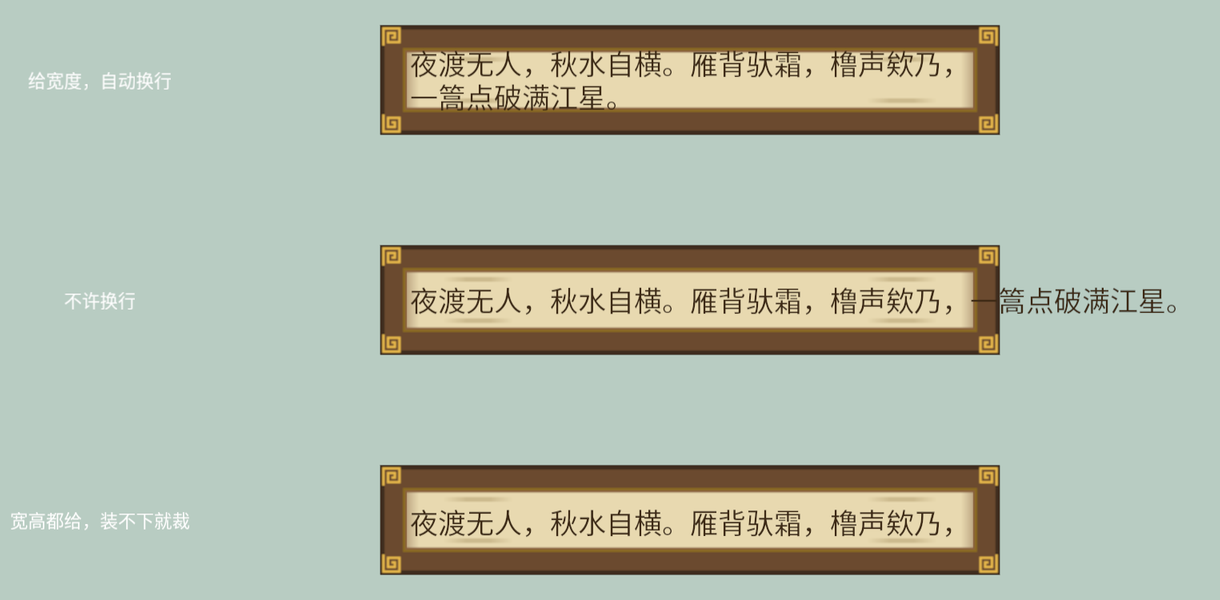
Figure 16-7:TextBounds 三态——new_horizontal 只管宽、NoWrap 出框、宽高都给则裁掉装不下的行
逐框看:
- 框一:
TextBounds::new_horizontal(560.0),只给宽度。词到 560 逻辑像素就折行,高度随行数自己长。这是字幕、对话框最常用的形态。注意中文的换行毫不费力——LineBreak::WordBoundary(默认值)按 Unicode 断行规则走,而汉字之间天然处处可断,所以中文文本用默认值就对了。WordBoundary真正的用武之地是英文:它不拆单词。如果文本里混着超长英文单词或 URL,一个“单词”比框还宽时整行憋住不折,那才轮到AnyCharacter(哪个字符越界就从哪断,不惜拆词)或WordOrCharacter(先按词,词太长再按字符)出场。 - 框二:
LineBreak::NoWrap,不许软换行(\n硬换行仍有效)。词成了一条长龙——而且注意它从框内左端起笔、溢出全堆在右边,不是两头均匀出界。这不是巧合:文字块的Anchor对齐的是TextBounds那个“框”(给了宽度时),Justify::Left让每行从框的左边起笔,装不下的部分自然全甩到右侧。出框的词照画不误——画到了字幕框图片的外面,落在浅青灰清屏色上,所以这次能清楚看到它从框右侧伸出去。 - 框三:
TextBounds::new(560.0, 30.0),宽高都给。30 像素只够一行(28 号字 × 1.2 行高 ≈ 34),折行后的第二行整行消失。裁切的细则要记牢:只裁完全出界的字形——第一版示例给的高度是 76,第二行的字头还压在界内,结果两行全保留了,什么都没裁掉。源码文档对此很坦白:TextBounds主要用来管换行,别拿它当严格的裁切框(真要硬裁,等第 28 章 UI 的 overflow)。
词是框的子实体:Listing 16-6 里
Text2d挂在字幕框 Sprite 的children!里——框挪词跟着挪(第 9 章的层级),Transform::from_translation(Vec3::Z)让词画在框上面一层(第 13 章的 z 排序)。2D 的“对话框”就是这么一对父子。
Justify 与 Anchor 的分工
TextLayout 的另一个字段 justify 管对齐。它和 Anchor 的关系容易缠成一团,拆开看其实泾渭分明:
Justify管块内:多行文字之间,行与行怎么对齐——左齐、居中、右齐、两端撑满(Justified)。它不挪整块字的位置。Anchor管块外:整块字作为一个矩形,钉在Transform坐标的哪个点上——和第 15 章 Sprite 的锚点一字不差。
fn setup(mut commands: Commands, asset_server: Res<AssetServer>) {
    commands.spawn(Camera2d);
    let zh_font = asset_server.load("fonts/book-sans-sc-regular.otf");
    let text_font = TextFont {
        font: FontSource::Handle(zh_font.clone()),
        font_size: FontSize::Px(26.0),
        ..default()
    };
    // 每个样本的 Transform 钉子位置都画一枚金色图钉作参照
    let pin = |commands: &mut Commands, x: f32, y: f32| {
        commands.spawn((
            Sprite::from_color(Color::srgb(0.91, 0.72, 0.29), Vec2::splat(8.0)),
            Transform::from_xyz(x, y, 1.0),
        ));
    };

    // 第一排:同一块两行字,三种 Justify——只挪行与行的相对位置
    let verse = "渡口\n夜话连台";
    for (x, justify) in [
        (-380.0, Justify::Left),
        (0.0, Justify::Center),
        (380.0, Justify::Right),
    ] {
        pin(&mut commands, x, 150.0);
        commands.spawn((
            Text2d::new(verse),
            text_font.clone(),
            TextLayout::justify(justify),
            Transform::from_xyz(x, 150.0, 0.0),
        ));
    }

    // 第二排:同一行字,三种 Anchor——挪的是整块字相对钉子的位置
    for (x, anchor) in [
        (-380.0, Anchor::TOP_LEFT),
        (0.0, Anchor::CENTER),
        (380.0, Anchor::BOTTOM_RIGHT),
    ] {
        pin(&mut commands, x, -150.0);
        commands.spawn((
            Text2d::new("梢公摇橹"),
            text_font.clone(),
            anchor,
            Transform::from_xyz(x, -150.0, 0.0),
        ));
    }
}
Listing 16-7:上排同一块两行字换三种 Justify,下排同一行字换三种 Anchor,金色图钉标出 Transform 的位置(examples/listing-16-07.rs)
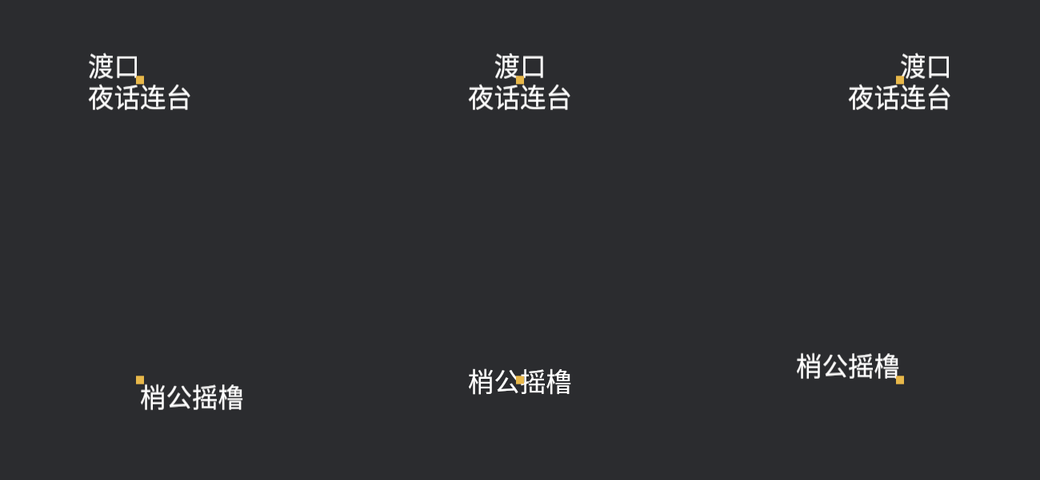
Figure 16-8:Justify 挪的是行与行的相对位置(金钉不动),Anchor 挪的是整块字相对金钉的位置
一个常见的“为什么不生效”:给单行文字设 Justify::Center 毫无反应。道理在源码文档里写明了——Justify 对齐的参照物是文本块自己的宽度,单行文字块宽就是行宽,没有可对齐的余地;除非配上带明确宽度的 TextBounds,行才有“框”可以参照。单行文字想居中,用的是 Anchor(默认 CENTER 已经是居中)。
框、行、块都安排明白了。但字幕真正的灵魂是会变——下一节让词一个字一个字地长出来。